

With the free Llamly MCP plugin, Codex can work on your WordPress site: create and edit pages and posts, change Gutenberg blocks, upload media, organize menus, categories and tags, and undo its own changes. You create an access key in wp-admin and run one command in the terminal. The Codex app reads the same configuration as the CLI, and it works with a WordPress site on your computer too.
What you need
- A WordPress site where you can install plugins (public or local).
- Codex installed and signed in.
Steps
- Install Llamly MCP from Plugins › Add New in wp-admin and activate it.
- Open Llamly › Connections and choose Codex.
- Create an access key. Give it a name (for example “Codex · my computer”) and choose the access: full access, read only, or chosen tools by category. Click Create key. It’s shown only once, so copy it now.
- Run the command. The recipe puts your key into it for you. It looks like this:
export LLAMLY_API_KEY="YOUR_KEY"
codex mcp add my-site --url https://your-site.example/wp-json/llamly/v1/endpoint \
  --bearer-token-env-var LLAMLY_API_KEY
Codex reads the key every time it starts, so also add the export line to your ~/.zshrc (or your shell’s profile).
- Check that it works. Start Codex and run
/mcp. Your site should show up with its tools.
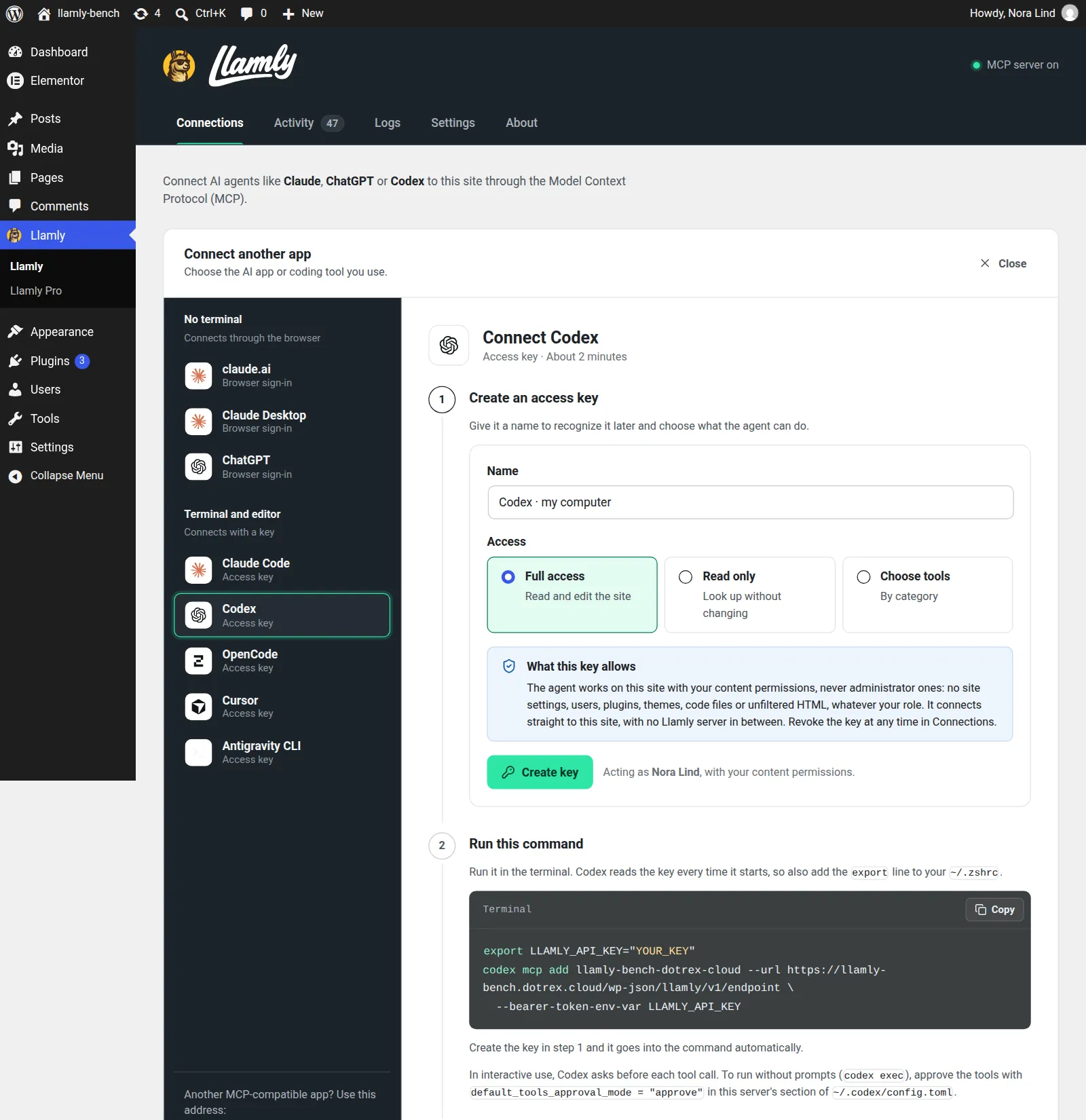
In interactive use, Codex asks before each tool call. To run without prompts (codex exec), approve the tools with default_tools_approval_mode = "approve" in this server’s section of ~/.codex/config.toml.
Your first request
Ask Codex:
List the drafts on my site that haven’t been published yet.
After the first request, Llamly marks Codex as connected and the request shows up in Llamly › Logs.
What Codex can and can’t do on your site
The key acts as your WordPress user, with your content permissions and never administrator ones: no site settings, users, plugins, themes, code files, SQL or shell on the server. Every change is listed in Llamly › Activity with an Undo button, and safe mode makes the agent confirm before it deletes something or undoes a change. Lost the key? Create another one and revoke the old one in Connections.
Watch the tutorial
The 2-minute video walks through a connection from install to first request: watch it on YouTube.
Get Llamly MCP
Llamly MCP is free on WordPress.org. Download Llamly MCP from WordPress.org. Using another app? Compare all apps.